Household items, kitchen tools, cleaning accessories, containers, organizers, furniture hardware, and everyday devices
Identify tools, products, parts, antiques, and household items from one clear photo
Object Identifier for Unknown Items and Everyday Tools
Use this Object Identifier when you are asking, “What is this object in my photo?” Upload or paste one clear image to compare the item’s shape, proportions, materials, surface, moving parts, fasteners, labels, symbols, controls, connectors, and surroundings. The result suggests the most likely category or use, explains the visible evidence, and stays broader when an exact brand, model, age, or purpose cannot be confirmed.
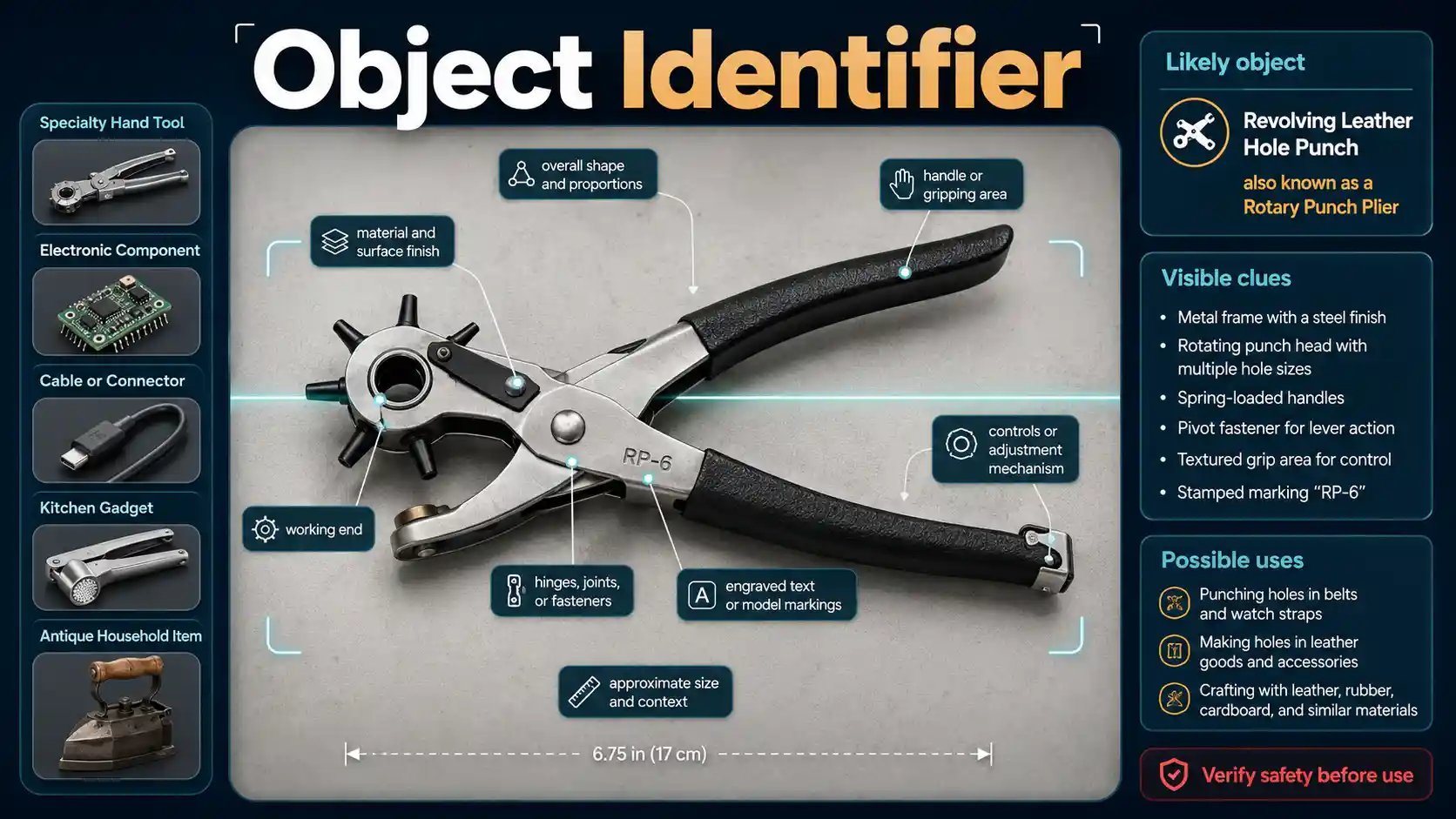
How object identification works
Construction, working parts, labels, and context build the match
The analysis starts with the complete silhouette and physical construction. It compares material, finish, proportions, handles, joints, fasteners, moving parts, working ends, controls, ports, and connectors before considering a more specific name.
Readable labels can be decisive. A model plate, maker mark, voltage label, date code, UPC, patent number, or stamped size may turn an unknown object identifier result into a product family or exact model candidate. Missing or unreadable text should never be guessed.
Context changes meaning. The same small metal fitting can serve different purposes in plumbing, automotive work, furniture, electronics, laboratory equipment, or a machine assembly. The result should explain why the surrounding setting supports or weakens each possibility.
- 1Upload, take, or paste one image
Choose a file, use your phone camera, click the paste icon, or press Ctrl+V or Command+V.
- 2Add facts that the photo cannot show
Country, environment, approximate size, location, and observed behavior can narrow the answer.
- 3Review the match and its evidence
Check the likely name, confidence bar, visible clues, alternatives, safety note, and recommended next step.
Object and product coverage
Identify everyday items, tools, products, parts, and collectibles
The Object Identifier covers many manufactured objects and visible components. It returns a broader category or likely function when branding, model plates, dimensions, internal construction, or physical testing would be required for a precise answer.
Hand tools, workshop accessories, fasteners, measuring devices, cutting tools, clamps, adapters, fittings, and machine parts
Consumer products, appliances, chargers, remotes, cables, connectors, controls, accessories, and visible product categories
Electronic and mechanical components at a broad level when packages, markings, pin layouts, ports, and scale are visible
Office, school, craft, sewing, gardening, automotive, bicycle, sporting, musical, and hobby equipment
Decorative objects, collectibles, reproductions, vintage-looking items, and possible artifacts without making authenticity or value claims
A broader material, function, or object family when the exact brand, model, date, or intended use is not visually supported
Object features that matter
Show the parts that reveal construction, function, and identity
Color alone rarely identifies a manufactured object. The strongest evidence usually comes from overall form, material, working features, connectors, readable markings, dimensions, and where the item belongs.
Photograph the complete object first, then add close views of labels, model plates, logos, stamped numbers, connectors, controls, blades, fasteners, working ends, and damaged areas. Include a ruler or familiar object for scale, and describe where the item was found. Do not energize, open, taste, smell, clean, dismantle, or operate an unknown object just to obtain a better photo.
- Place one main object on a plain background and show the entire outline before taking close-up images.
- Photograph the front, back, side, underside, working end, and any removable accessory without unsafe disassembly.
- Fill the frame while keeping edges, handles, cords, connectors, and attachments visible.
- Use bright, even light and change the angle to reduce glare on metal, glass, screens, labels, and glossy plastic.
- Capture every readable word, symbol, logo, model plate, date code, voltage label, patent number, and certification mark.
- Include a ruler, coin, or familiar object for scale without covering important features.
- Show where the object was found, such as a toolbox, kitchen, vehicle, appliance, workshop, attic, field, or packaging.
- Keep related parts together, but photograph them separately when multiple objects compete for attention.
- Do not connect power, install batteries, press unknown controls, open sealed housings, or clean old surfaces for the photograph.
What the object result contains
A useful object match separates visible facts from assumptions
The result should state the most defensible name or category, explain the construction clues, list realistic alternatives, transcribe readable markings, and identify which claims still require a manual, manufacturer, technician, appraiser, or official database.
- The most likely object name, category, and general purpose supported by the photograph
- A broader product, tool, component, material, or artifact family when an exact answer is not defensible
- A high, moderate, or low confidence label without an uncalibrated percentage
- Visible evidence such as shape, material, construction, working end, controls, connectors, labels, and context
- Legible markings transcribed cautiously without inventing missing characters
- Plausible alternative objects and the feature or additional view that would separate them
- Important limits involving model, authenticity, age, value, functionality, safety, recall, and legal status
- A practical next step such as checking a model plate, manual, manufacturer, recall database, appraiser, technician, museum, or local authority
Objects that are easy to confuse
Shared housings and shapes do not prove the same function
Manufactured items often reuse generic forms, connectors, materials, and colors. Labels, internal specifications, working ends, dimensions, and context may be more important than appearance.
USB-C cable or Thunderbolt cable
The connector shape may be identical. Logos, cable markings, e-marker information, packaging, certified specifications, and functional testing are needed to confirm supported data, video, and power capabilities.
AC adapter, charger, or simple power supply
Housing shape is not enough. Input, output, voltage type, amperage, polarity symbol, connector dimensions, device compatibility, and manufacturer documentation determine the actual role.
Smoke alarm or carbon monoxide alarm
Both can use round or rectangular vented housings. Printed labels, sensor description, test instructions, model plate, indicator symbols, installation location, and expiration guidance distinguish them.
Hex key or Torx key
The shaft and handle may look similar at a distance. A sharp end-on photograph reveals a six-sided hex profile or six-lobed star profile, while stamped size confirms the intended fastener.
Antique object or modern reproduction
Wear, patina, construction, marks, and style can suggest possibilities, but reproductions can imitate all of them. Provenance, materials analysis, expert inspection, and comparison with documented examples are needed.
Functional tool, toy, prop, or decorative replica
Scale, material, moving parts, edges, fasteners, safety markings, packaging, and internal construction matter. Do not operate or treat the item as harmless until its actual function is confirmed.
Why object identification can fail
A second side or readable label often matters more than a wider search
Generic housings, missing accessories, damaged surfaces, glare, unreadable labels, absent scale, and hidden working parts can make unrelated objects look identical. Low confidence is more responsible than inventing a model or purpose.
- The object fills only a small part of a cluttered photograph.
- Only the decorative front is shown while the underside, back, connector, label, or working end is hidden.
- Glare makes engraved text, screens, model plates, and surface features unreadable.
- A screenshot or compressed marketplace image removes the details needed to separate similar products.
- No scale is provided for a fitting, fastener, component, tool bit, or miniature object.
- Several loose parts appear together without identifying which one should be analyzed.
- The user asks for authenticity, price, age, safety, recall, or legal ownership that appearance alone cannot prove.
- The object has been cleaned, polished, opened, powered, altered, or damaged before its original condition is documented.
- A living organism, plant symptom, bird, animal, insect, or mushroom is submitted to the object workflow.
Worked object-identification scenarios
Function becomes clearer when the right parts are visible
Each scenario combines the full object with close photographs of the specific evidence that separates similar tools, components, products, household items, and artifacts.
Unknown metal tool found in a garage
A full view shows the handle and working end, while close photos reveal jaw shape, adjustment threads, stamped size, maker mark, wear pattern, and scale. Those clues can separate a specialty wrench, puller, clamp, crimping tool, or unrelated machine accessory.
Small electronic part on a circuit board
Images of the top code, underside, pins, package shape, board reference label, nearby components, connector direction, and exact dimensions can identify the component family even when the precise part number remains uncertain.
Kitchen gadget with no visible label
The handle, blade or pressing surface, hinge, slots, food-contact surfaces, storage position, and comparison with familiar utensils can reveal whether the item cuts, peels, opens, strains, measures, or shapes food.
Appliance or charger with a model plate
A product identifier from an image becomes more useful when the front, controls, ports, plug, power label, model number, voltage, output, manufacturer, and accessory are all readable. Official documentation should verify compatibility and safety.
Old object discovered outdoors
Photograph the object exactly where it lies, include the surrounding soil and landmarks, and avoid cleaning or moving it. Material, construction, corrosion, and context may suggest an artifact category, but a heritage professional must assess significance and legal handling.
Use the result responsibly
Identification does not prove that an object is safe, authentic, or functional
Do not plug in, charge, open, dismantle, taste, smell, clean, fire, ignite, or operate an unknown object until its identity and condition are independently verified. Keep away from exposed wiring, leaking batteries, gas cylinders, chemicals, sharp edges, pressure containers, ammunition, suspicious packages, and damaged safety equipment.
Verify safety-critical products with the manufacturer, a qualified technician, an official recall database, or the responsible authority. Use an appraiser or museum professional for authenticity and value. Leave suspected archaeological objects in place, and avoid handling suspicious, pressurized, energized, leaking, sharp, chemical, explosive, or weapon-like items.
Choose the correct specialist
Living subjects and mixed scenes need a different analysis
Questions about identifying objects by photo
Direct answers before you upload an unknown item
Can I identify an object from a photo online?
Yes. Upload a clear image of one main item and the Object Identifier will compare its form, materials, parts, markings, controls, connectors, and context before suggesting a likely category or use.
What is this object in my picture?
The answer depends on visible evidence. Show the whole object, then add the back, underside, working end, labels, model plate, connectors, and a size reference.
Can the tool identify a brand or exact model?
Sometimes. A distinctive design and readable logo, model number, serial-format label, patent marking, or specification plate may support a product family or exact model. The result stays broader when those clues are absent.
Can I identify a tool by picture?
Yes. Photograph the complete handle, working end, jaws, blade, bit, adjustment mechanism, scale, and stamped markings. Similar specialty tools often need several angles.
Can it recognize electronic components?
It can often suggest a component family from package shape, pins, connectors, board position, markings, and dimensions. Do not rely on appearance alone for an exact part number or electrical rating.
Can a photo identify a household item?
Often. Kitchen gadgets, fittings, organizers, cleaning tools, remotes, accessories, and common hardware may be recognizable when their complete form and working features are visible.
Can the Object Identifier check an antique?
It may suggest an object category, material, construction method, maker mark, or broad period. It cannot authenticate an antique, establish provenance, or provide a reliable appraisal.
Can it tell me how much an object is worth?
No. Value depends on confirmed identity, authenticity, maker, age, provenance, condition, completeness, market demand, and physical inspection by an appropriate specialist.
Can it tell whether a product is recalled?
No. Use any visible manufacturer, model number, UPC, date code, or serial information to check the current official manufacturer or government recall database.
Can the result prove that an object is safe to use?
No. A photo cannot test wiring, insulation, batteries, pressure, structural integrity, contamination, calibration, hidden damage, or compliance. Have safety-critical items examined before use.
Should I power on an unknown electronic item?
No. First confirm the identity, voltage, polarity, connector, battery type, condition, and manufacturer instructions. Damaged batteries, cords, capacitors, and unknown equipment can create fire or shock risks.
Can I identify an item by picture without installing an app?
Yes. SnapIdentify works in a modern browser, so you can upload, drag, photograph, or paste an image without installing a dedicated object-identification app.
What if the photo contains several objects?
Crop or photograph each item separately. A clear single subject reduces the chance that the analysis focuses on packaging, background clutter, or the wrong component.
What should I do with a possible archaeological artifact?
Leave it in place, photograph it with its surroundings, record the location privately, avoid cleaning or moving it, and contact the responsible land manager or heritage authority.
Are uploaded object photos permanently stored by SnapIdentify?
SnapIdentify processes the normalized image for the request and does not intentionally write it to local disk. The configured AI provider processes the image under its service terms.
Authoritative visual-search, product, and artifact guidance
Verify models, recalls, safety, and historical objects independently
These resources explain image-based search, the importance of product labels and model codes, and why possible archaeological objects should be documented in place rather than removed.
- Google Search Help — Search with an Image
Google explains how visual search can use an uploaded image, a dragged file, a website image, or a selected region to find objects, similar images, and related information.
- U.S. Consumer Product Safety Commission Recall Guidance
CPSC guidance emphasizes identifiers such as model numbers, UPCs, date codes, serial information, and permanent labels when distinguishing affected products.
- National Park Service — What If I Find an Artifact?
The National Park Service advises leaving possible archaeological artifacts in place, documenting their location, and notifying the responsible authority instead of removing them.